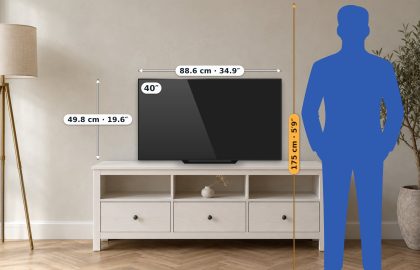
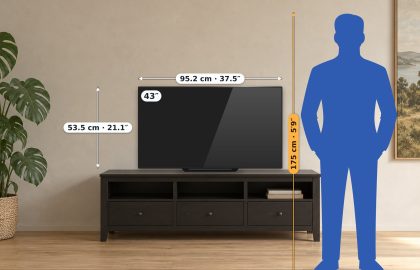
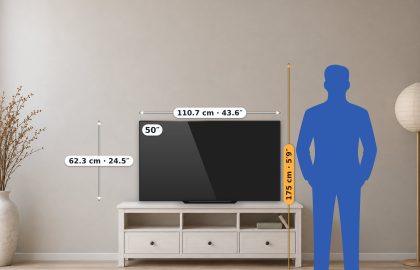
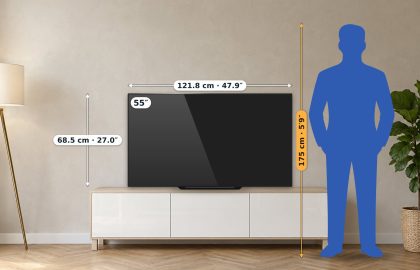
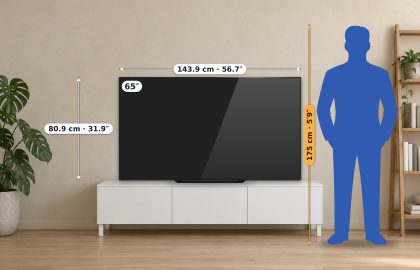
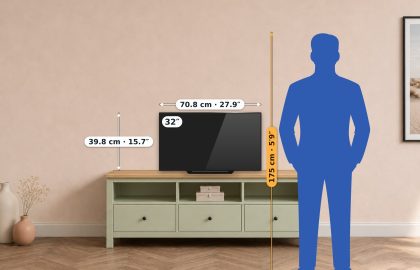
Choose two screen sizes to see them side by side, drawn to scale, with the width and height in centimetres and inches. Add a third size if you are torn between three, and compare them with everyday objects to picture the size in your own room.
The diagonal is only 18% longer, but width and height grow together, so the screen grows much more.
Will it fit your wall?
- 55″ needs about 141.8 cm of clear wall
- 65″ needs about 163.9 cm of clear wall
How far to sit
- 55″ 4K: 1.7–2.2 m · HD: 2.1–3.5 m
- 65″ 4K: 2.0–2.6 m · HD: 2.5–4.1 m
4K: 1.2 to 1.6 × the diagonal. HD: 1.5 to 2.5 ×. Viewing distance guide
Screen only (panel, 16:9), without bezel or stand. Sizes are the diagonal in inches, as sold in UK shops.
How to compare TV sizes
A TV’s size is the length of its screen from one corner to the opposite corner, measured in inches. That single number hides how much screen you actually get. To compare TV sizes properly, look at three things: the width, the height and the screen area.
Take a 55 inch and a 65 inch TV. The 55 inch screen is 121.8 cm wide and 68.5 cm tall. The 65 inch is 143.9 cm wide and 80.9 cm tall. That is 22.1 cm more width and 12.4 cm more height. The diagonal grows by only 18%, but the screen area grows by 40%, because the width and the height increase at the same time.
The tool above does this for any sizes from 24 to 98 inches. Every figure comes from the same 16:9 screen geometry, so the numbers match our size pages and comparison images.
TV size comparison in your living room
The diagram shows the screens to scale, but a room is easier to picture with something familiar next to them. Under the diagram you can swap the size reference: a 60 cm houseplant, a 330 ml can, a PS5 standing upright or a full-size acoustic guitar, all drawn at the same scale as the TVs.
Before you buy, check three things in the room.
Wall or unit width. Allow the panel width plus about 10 cm either side. A 65 inch TV needs around 163.9 cm of clear wall; a 75 inch panel alone is 166.0 cm wide, so plan for about 186.0 cm. Put your wall width into “Will it fit your wall?” to check every size at once.
Seating distance. For 4K, sit roughly 1.2 to 1.6 times the screen diagonal away. That is 1.7 to 2.2 m for a 55 inch and 2.0 to 2.6 m for a 65 inch.
The stand or feet. Our figures cover the screen only. Feet are often set near the edges, so a TV can need a wider unit than its panel suggests. Check the model’s spec sheet for the stand width.
Popular TV size comparisons
These are the comparisons UK buyers look up most. Each page has a living-room image to scale, a dimension diagram and the full measurements in cm and inches. The figure next to each pair is how much more screen the bigger TV gives you.
- 24″ vs 32″ TV+78% screen
- 32″ vs 40″ TV+56% screen
- 32″ vs 43″ TV+81% screen
- 40″ vs 43″ TV+16% screen
- 42″ vs 48″ TV+31% screen
- 40″ vs 50″ TV+56% screen
- 43″ vs 50″ TV+35% screen
- 32″ vs 55″ TV+195% screen
- 42″ vs 55″ TV+71% screen
- 43″ vs 55″ TV+64% screen
- 48″ vs 55″ TV+31% screen
- 50″ vs 55″ TV+21% screen
- 55″ vs 58″ TV+11% screen
- 43″ vs 65″ TV+129% screen
- 50″ vs 65″ TV+69% screen
- 55″ vs 65″ TV+40% screen
- 55″ vs 75″ TV+86% screen
- 65″ vs 75″ TV+33% screen
- 65″ vs 77″ TV+40% screen
- 75″ vs 80″ TV+14% screen
- 77″ vs 83″ TV+16% screen
- 55″ vs 85″ TV+139% screen
- 65″ vs 85″ TV+71% screen
- 75″ vs 85″ TV+28% screen
- 80″ vs 85″ TV+13% screen
- 75″ vs 98″ TV+71% screen
- 85″ vs 98″ TV+33% screen
Why a few extra inches make a big difference
Screen area grows with the square of the diagonal. Going from 43 to 50 inches sounds like a small step, but the 50 inch screen is 15.5 cm wider and has 35% more picture. Moving up one size usually changes the room more than people expect, which is why comparing the width and height side by side is more useful than comparing the inch number alone.
The opposite is also true at the top end. Between 75 and 77 inches, or 83 and 85, the difference is a few centimetres, and other things such as price, panel type and brightness matter more than size.
TV sizes in cm and inches
UK shops sell TVs by the diagonal in inches, but most of us measure walls and furniture in centimetres. The tool shows both: switch the units to see every figure in inches first. For the exact width and height of a single size, see its dimensions page.
- 32 inch TV dimensions
- 40 inch TV dimensions
- 43 inch TV dimensions
- 50 inch TV dimensions
- 55 inch TV dimensions
- 65 inch TV dimensions
- 75 inch TV dimensions
- 85 inch TV dimensions
Frequently asked questions
How do you compare TV sizes?
Compare the width, height and screen area, not just the diagonal. Pick two sizes in the tool above to see them to scale, with the measurements in cm and inches.
How much bigger is a 65 inch TV than a 55 inch?
A 65 inch screen is 22.1 cm wider and 12.4 cm taller than a 55 inch, with 40% more screen area.
Is TV size measured diagonally?
Yes. The size in inches is the diagonal of the visible screen, from one corner to the opposite corner. It doesn't include the bezel or the stand.
Is a 65 inch TV too big for my living room?
It depends on your seating distance and wall width. For 4K, a 65 inch suits a viewing distance of about 2.0 to 2.6 m, and needs about 163.9 cm of clear wall.
Do TV sizes include the frame?
No. The advertised size covers the screen only. Modern bezels are thin, so the whole TV is usually only 1 to 2 cm wider and taller than the panel, but check the spec sheet if space is tight.